Coaching grounded in telemetry
The AI feedback is based on measurable inputs such as brake pressure, throttle position, speed, steering, gear, and delta. That keeps the coaching tied to the lap instead of giving generic driving advice.
AI racing coach
Hotlap.ai uses telemetry data to explain what happened during a lap. It helps drivers understand the practical difference between two laps, then turns those differences into coaching feedback that can be tested in the next practice run.
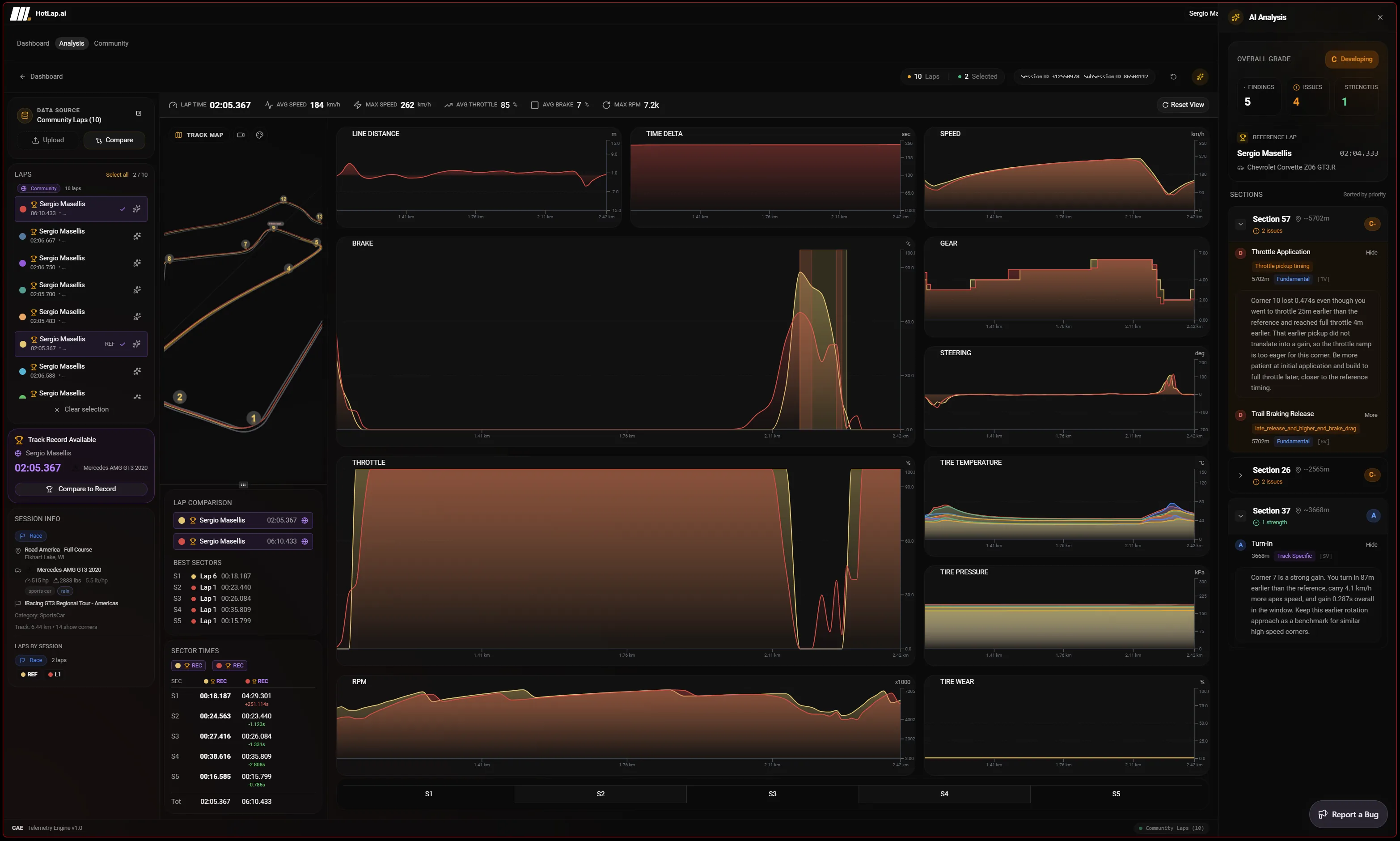
The AI feedback is based on measurable inputs such as brake pressure, throttle position, speed, steering, gear, and delta. That keeps the coaching tied to the lap instead of giving generic driving advice.
Hotlap.ai groups findings by section so drivers can focus on the parts of the lap where the largest improvements are available. Findings can point to brake points, peak brake pressure, trail braking, throttle timing, steering overlap, understeer, oversteer, gear at apex, upshift timing, or riding the brake or throttle.
Drivers can use Hotlap.ai alone after a session or with teammates to compare laps. Shared reference data makes it easier to identify repeatable habits instead of judging pace from lap time alone.
A focused path from session data to the next change you can test on track.
Select the lap and reference context, then let Hotlap.ai generate graded findings from the telemetry instead of manually hunting through every channel first.
The AI panel groups findings by section, grade, issue count, strengths, and priority so the first review starts with the highest-value corner.
Each finding is useful only if it can be checked. Use chart markers and jump-to-distance actions to inspect the exact brake, throttle, steering, speed, or gear trace behind the suggestion.
Convert the AI finding into a single driving behavior to test, such as releasing brake earlier, delaying throttle less, or carrying more minimum speed.
This page should feel different from the telemetry-analysis page: it is about prioritization and explanation. The AI coach is there to decide what deserves attention first, not to hide the data.
The strongest use case is after a session when the driver knows the lap was slow but does not know whether the cause was braking, throttle, steering, line, gear, or corner speed.
Hotlap.ai evaluates driver-input patterns such as brake application, brake points, peak brake pressure, trail braking shape, throttle timing, throttle release, steering overlap, turn-in, understeer, oversteer, gear at apex, upshift timing, and riding brake or throttle.
Yes. The AI findings are tied to lap telemetry and reference comparisons. Drivers can jump back to the relevant distance on the lap and inspect the charts that support the finding.
Use Hotlap.ai to compare the lap, understand the inputs, and leave review with one clear thing to try next.