Sim racing telemetry

Sim racing telemetry for faster, more consistent laps

Hotlap.ai turns sim racing telemetry into a practical improvement workflow. Instead of guessing where lap time disappeared, drivers can compare inputs, inspect track position, and review AI-generated coaching notes after each session.

Free to startDesktop and web workflows
Built for iRacingNative .ibt telemetry context
Driver-firstReview what changes the lap
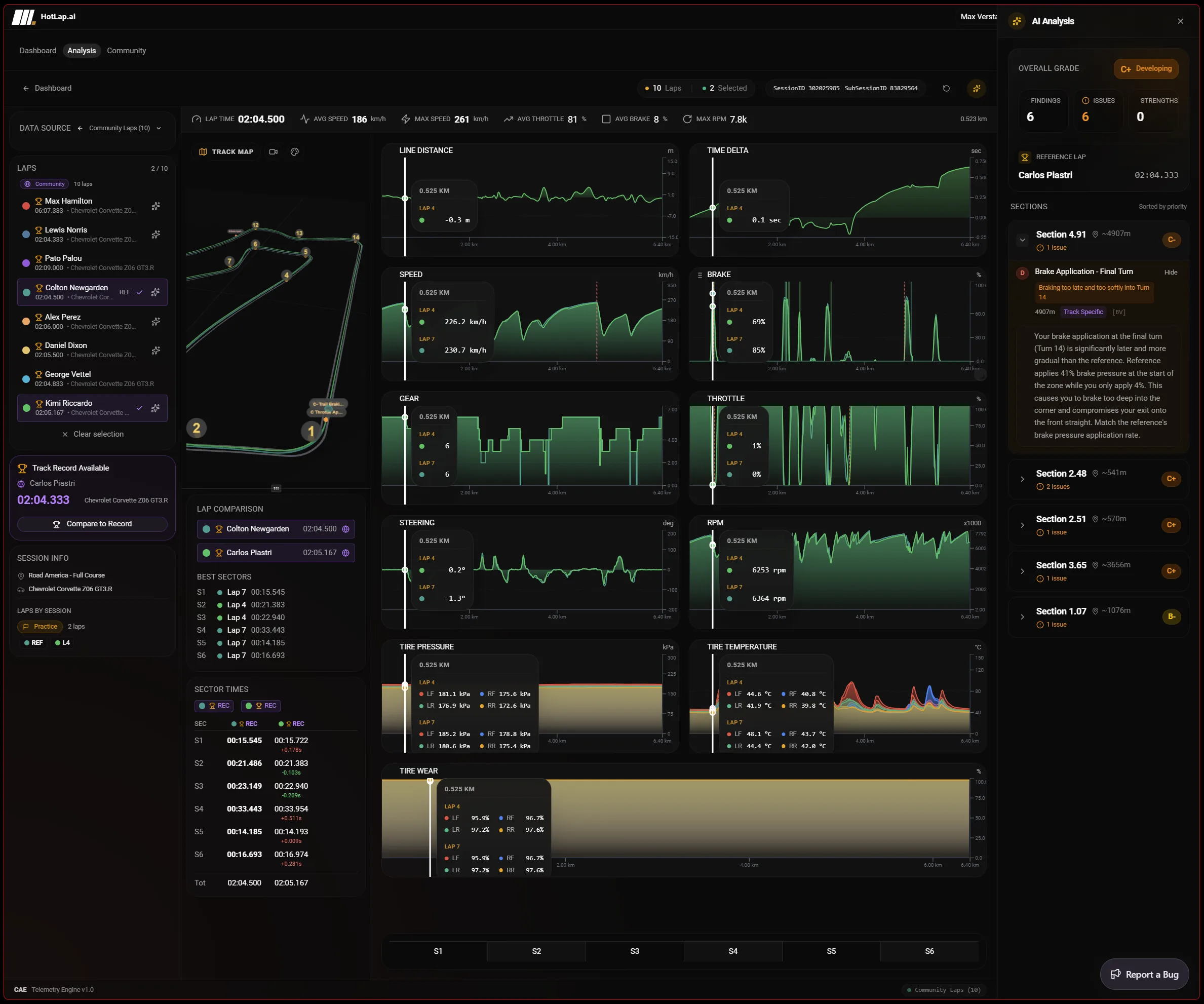
Hotlap.ai sim racing telemetry overview with lap data, charts, track context, and driver improvement workflow
1

Find the input behind the lap time gap

A delta trace tells you where the gap opened. Telemetry explains why. Hotlap.ai combines both so braking, throttle, steering, and racing line differences are visible at the exact part of the lap where time was gained or lost.

2

Practice with a clear priority

The fastest improvement usually comes from fixing one or two high-value corners, not from staring at every channel after every lap. Hotlap.ai highlights the sections worth reviewing first.

3

Use community data as a benchmark

Leaderboards and reference laps make telemetry more useful because drivers can compare against real pace from the same car and track combination. That context helps separate setup questions from driving technique.

How to read sim racing telemetry

A focused path from session data to the next change you can test on track.

  1. Step 1

    Choose the driving question

    Use sim racing telemetry when lap time alone is not enough. Pick a question first: entry speed, brake release, throttle confidence, steering correction, tire behavior, or stint consistency.

  2. Step 2

    Compare the signals

    Read speed, brake, throttle, steering, gear, RPM, tire temperature, tire pressure, and delta together so the driver input and car response stay connected.

  3. Step 3

    Separate technique from context

    Community benchmarks and session metadata help show whether the gap is likely technique, traffic, car choice, or track conditions rather than a single isolated mistake.

  4. Step 4

    Build a short practice plan

    Turn the telemetry review into one or two repeatable tests for the next run instead of trying to fix every trace at once.

Best used for learning telemetry as a habit

This page is broader than one iRacing analysis screen. It explains why telemetry matters for sim racers: it connects what the driver felt with measurable inputs and car response.

Use it as the general workflow page for drivers who are new to telemetry and need to understand how delta, channels, maps, sectors, and reference laps work together.

Questions drivers ask

Is sim racing telemetry useful without an engineer?

Yes. The fastest wins often come from simple input differences: braking too early, releasing too slowly, delaying throttle pickup, turning in inconsistently, or choosing the wrong gear. Hotlap.ai keeps those differences visible and adds AI findings to prioritize them.

Does Hotlap.ai replace raw telemetry charts?

No. Hotlap.ai uses AI to summarize likely issues, but it keeps detailed charts available so drivers can verify every recommendation against the underlying speed, brake, throttle, steering, gear, RPM, delta, tire, and map data.

Find your perfect lap.

Use Hotlap.ai to compare the lap, understand the inputs, and leave review with one clear thing to try next.

Open the sim racing telemetry app